Blog 014: Using the Supplemental CSV Files to Chart Performance
CSV files themselves are natively supported by MS-Excel, R, SPSS and SAS which makes it easy to analyze and chart your program's performance. Prior to the existence of CSV files subscriptions, the only way to analyze or chart your program's performance was to manually type the values found in the NCLEX® Program Reports into a spreadsheet or database. This time consuming and error prone process is not necessary with the purchase of Supplemetnal CSV files.
Some subscribers have asked us, what kind of analyses might I do with the NCLEX® Program Reports Supplemental CSV data? This is an excellent question. The NCLEX® Program Reports Supplemental CSV files can be used to track your program's performance over time, evaluate your program by comparison group, and/or compare the performance of multiple educational programs within your organization. Below are a few examples of how the information in the CSV files can used. Keep in mind that there are many more ways to use the data then we have outlined below. These charts contain sample data that are similar to the data found in the CSV files and the 2011-2012 Supplemental CSV files.
Getting Started
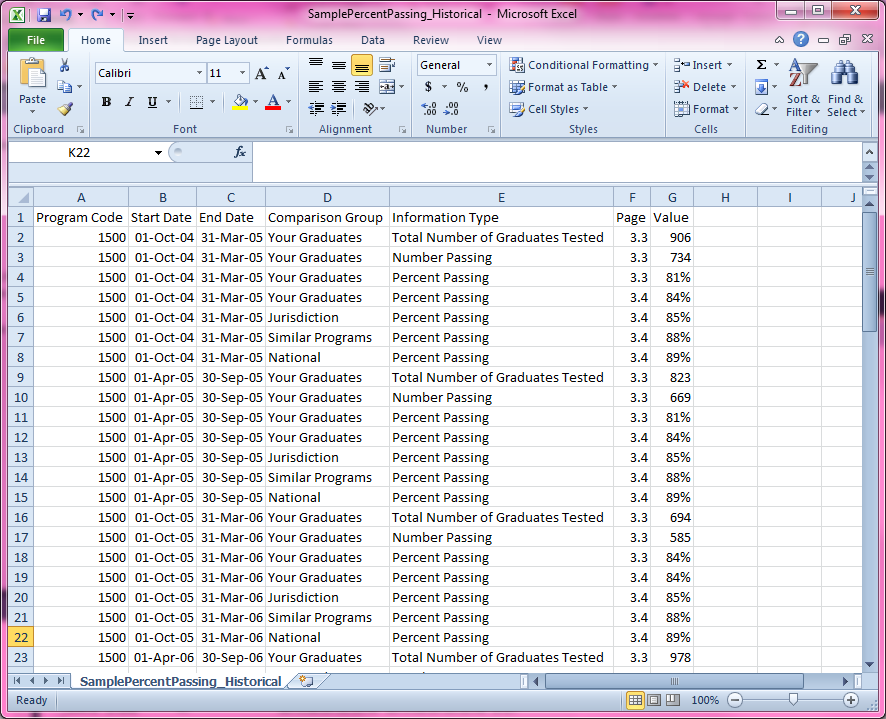
The Supplemental CSV files can be opened using many types of software, but the typical user will probably open and view the files using Microsoft Excel. Comparing each file to the corresponding page in the NCLEX® Program Reports may help you get acquainted with the data in the files. From there, you can begin organizing the information in a way that is helpful to you and your program. Creating your own graphs would be the final step in this process. Below is an image of the CSV file that contains the Passing Percentages found on pages 3.3 and 3.4 of the reports.
Track program growth
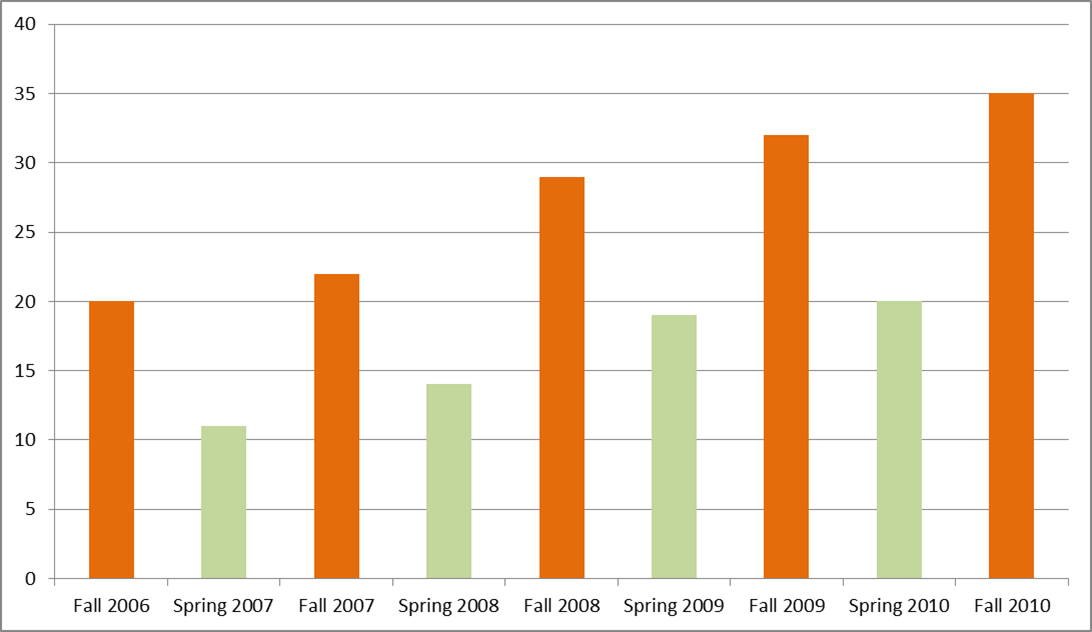
The Supplemental CSV files will tell you how many of your students have taken the NCLEX® Exam over the years. In this example, you can see how the number of students tested has increased over the years and how the size of the Fall cohort compared to the Spring cohort.
Figure 1: Number of Graduates Tested by Reporting Period
From Page 3.3: Percentage of Your Graduates Passing the NCLEX® Examination
Show progress
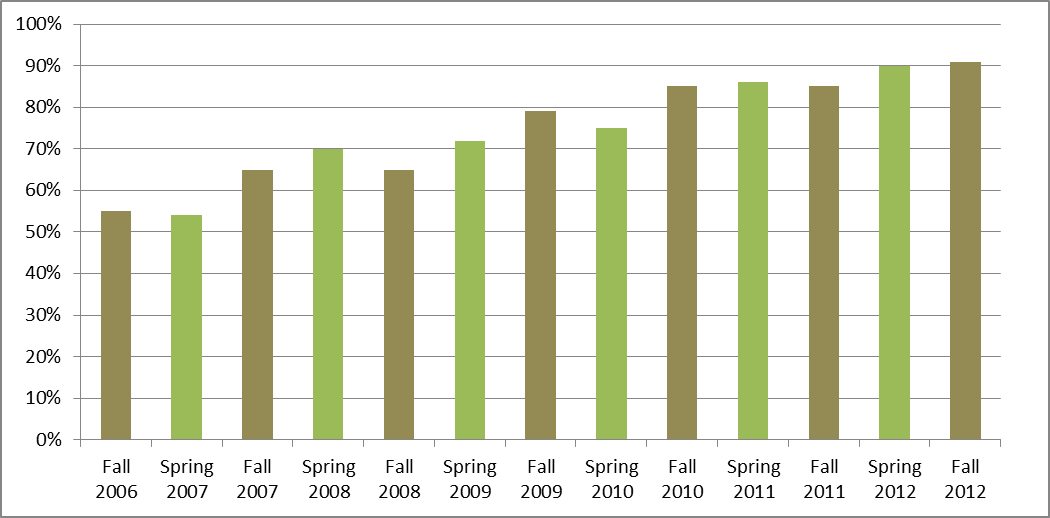
The Supplemental CSV files can be used to provide program administrators with visual information on how passing rates have progressed over time. This graph shows a program that has slowly increased its passing rate, improving a little bit each year. It is also useful to identify years in which your program's passing rate was lower than usual so that you can determine the cause and make adjustments.
Figure 2: Passing Rate by Reporting Period
From Page 3.4: Percentage of Your Graduates Passing the NCLEX® Examination
Compare Programs
The Supplemental CSV files can be used to compare different campuses or programs within your organization. In this example, you can see that the struggling ADN program managed to rapidly improve and exceed the passing rates of the BSN program. What might be the reason for this? Instructors? Class size? Having this information is the first step in understanding your program.
Figure 3: Passing Rate by Educational Program by Reporting Period
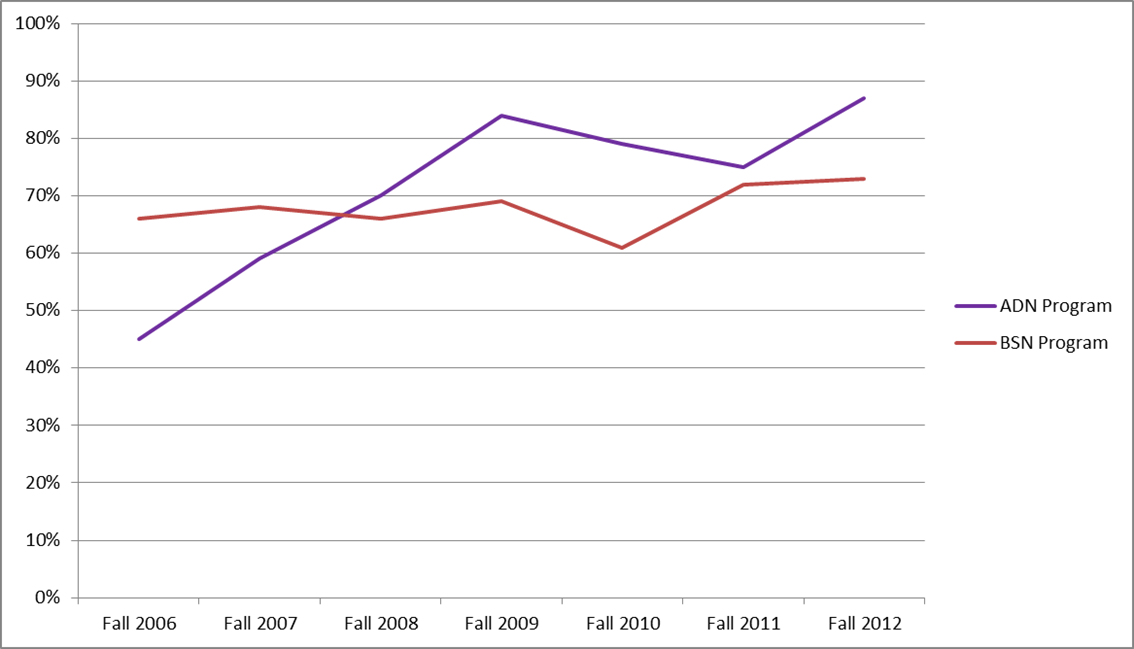
From Page 3.3: Percentage of Your Graduates Passing the NCLEX® Examination
Track graduate performance over time
The most valuable use of the Supplemental CSV files is to create charts that display the performance of your students over time. By doing so, you can identify the test plan areas or content dimensions in which you have improved or declined. This is a great tool for identifying where to focus your curriculum reform efforts. The following graph shows that the performance of your program's students declined in Psychosocial Integrity, Health Promotion and Maintenance, and Pharmacological Therapies. Based on this information, a program might benefit from modifying its efforts in this areas.
Figure 4: Test Plan Performance by Reporting Period
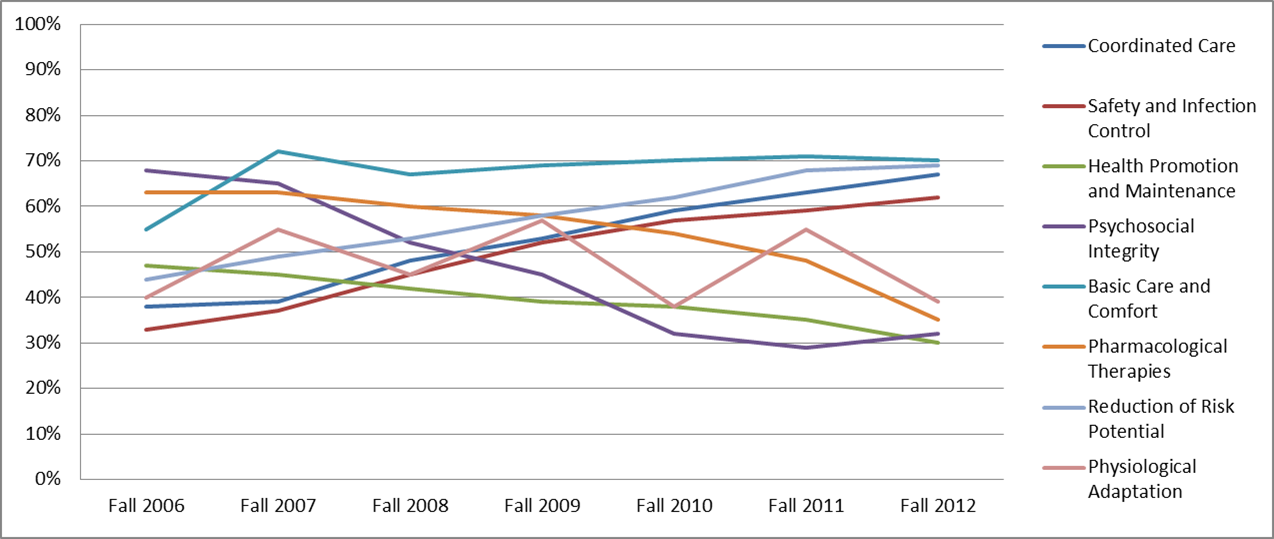
From Page 4.4: Test Plan Performance Report
Evaluate graduate performance by comparison group
The NCLEX Test Plan Report and Content Dimension Reports (Sections 4 and 5) of the NCLEX® Program Reports provide information about the performance of your graduates as compared to the performance of graduates within your jurisdiction, from similar programs (RN only), and across the nation. By analyzing the data within the Supplemental CSV files, you can evaluate the performance of your graduates relative to these three comparison groups. In the chart below, you can see that the typical graduate from this program is performing well compared to the national sample of graduates, just a little bit better than graduates from within the jurisdiction, and about the same as graduates from similar programs.
Figure 5: 2010 "Stages of Maturity" Percentile Ranks by Comparison Group
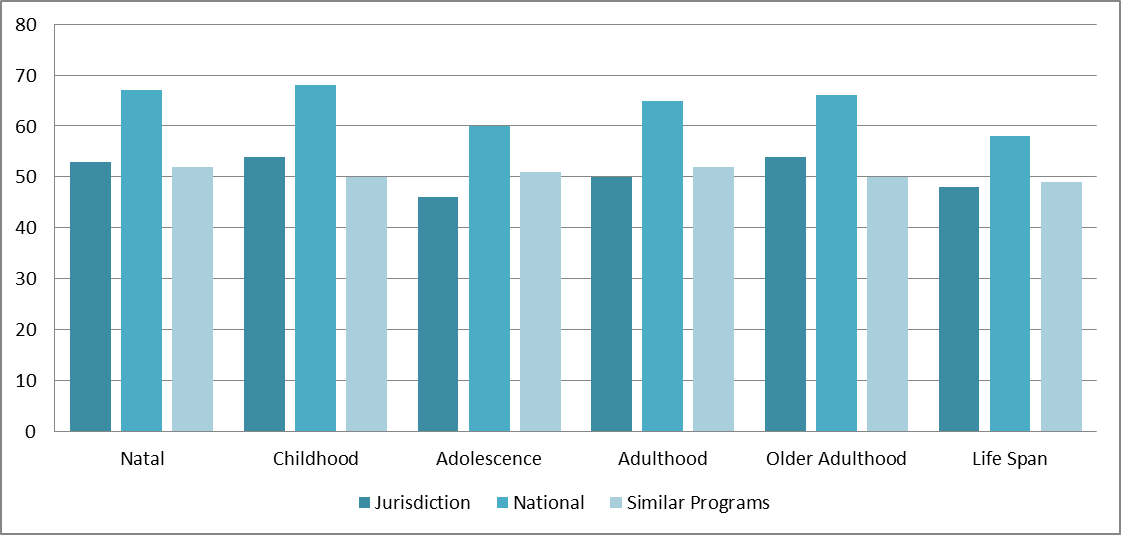
From Pages 5.5.3 and 5.5.4: Content Dimension Report
Continue reading this article
Sign up for a free account to access the full blog post and more.
Create Free Account Already have an account? Log in